
Minecraft: Bedrock Edition is now available on BoxToPlay. From the Minecraft installation page, you can choose between the official Bedrock Dedicated Server (BDS), customizable with add-ons, and NukkitX, designed for community servers using compatible plugins.
Bedrock players can join the same server from Windows, iOS, Android, Xbox, PlayStation, or Nintendo Switch. The client and server must still use compatible Bedrock versions to avoid “Outdated Client” or “Outdated Server” errors.
Official BDS or NukkitX: which should you choose?
| Official BDS | NukkitX | |
|---|---|---|
| Experience | Mojang and Microsoft’s official server with the reference Bedrock mechanics. | A community implementation of Bedrock where some mechanics can differ from the official server. |
| Customization | Bedrock add-ons made of Behavior Packs and Resource Packs. | JAR plugins designed specifically for Nukkit. |
| Best for | A faithful vanilla adventure or a world enhanced with add-ons. | Economies, permissions, land protection, teleportation, or mini-games. |
The two solutions serve different goals: choose BDS to stay close to the official experience, or NukkitX when plugins are central to your project.
Official BDS: the reference Bedrock experience
The Bedrock Dedicated Server is Mojang and Microsoft’s official server software. It is particularly well suited to groups who want the native Minecraft Bedrock behavior:
- Official gameplay: world generation, mobs, redstone, and commands run on the BDS engine.
- Bedrock cross-play: players can join from platforms compatible with Bedrock Edition.
- Tracked updates: new server versions are offered from the Minecraft Installation page.
More than 8,000 CurseForge Bedrock add-ons in a few clicks
Installing a Bedrock add-on manually normally means finding the right files, recognizing their manifests, and linking the Behavior Packs and Resource Packs to the world. The Add-ons & Packs page automates these steps for the official BDS runtime.
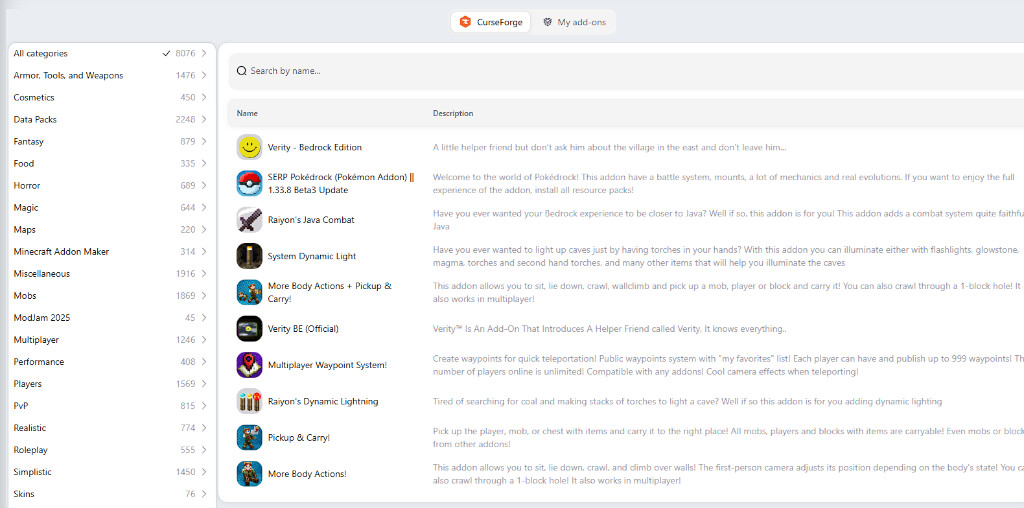
- Integrated CurseForge catalog: more than 8,000 projects are available in our public Bedrock add-on catalog, by category or search.
- Automated installation: the panel retrieves the required packs and links them to the active world.
- Centralized management: the My add-ons tab lets you view, enable, disable, or remove installed content.
- Resources for players: when an add-on requires them, Minecraft can prompt players to download resource packs when they connect.
Keep in mind: this manager covers CurseForge Bedrock add-ons. Content purchased from the Minecraft Marketplace is not part of this catalog. BDS add-ons and NukkitX plugins are also different formats and cannot be used interchangeably.
NukkitX: the community plugin route
NukkitX is aimed at more customizable Bedrock community servers. It accepts JAR plugins built for the Nukkit ecosystem, for example to add an economy, ranks, land claims, custom commands, or mini-games.
- Nukkit-compatible plugins only: a plugin made for Paper, Spigot, or Bukkit is not automatically compatible.
- Install it from the panel: NukkitX is available in the Server for Console / Mobile category of our Minecraft versions catalog.
- A deliberate choice: if official vanilla behavior and Bedrock add-ons are your priority, choose the official BDS runtime.
BoxToPlay tools remain available
BDS and NukkitX use the existing Minecraft plans. Choosing or changing the server runtime from the panel does not add a runtime-specific fee.
- Automated installation from your client area.
- NVMe storage and anti-DDoS protection included.
- Live console, file management, logs, and FTP access.
- Daily backups and restoration from the panel.
Launch your Minecraft Bedrock server
- Open your server in the panel, then go to Minecraft Installation.
- Select the Server for Console / Mobile category.
- Choose Minecraft Bedrock (Official) for BDS and add-ons, or NukkitX for Nukkit-compatible plugins.
- Click Install, then start the server.
- With BDS, open Add-ons & Packs, install content from the CurseForge tab, then manage it under My add-ons.
- With NukkitX, add only JAR plugins built for Nukkit to the
pluginsfolder over FTP. - Make sure your players use a compatible Bedrock version, then share the server address and port.
Whether you want a Bedrock world faithful to the official game or a community server enhanced with plugins, explore our Minecraft server hosting plans and choose the experience that fits your adventure.
More Articles
Minecraft Commands: Complete Java and Bedrock Guide
August 15, 2026How to install Cobblemon Academy 2.0 on a Minecraft server
August 09, 2026Minecraft 26.3: all the features announced so far
July 31, 2026BoxToPlay Partner Program
July 22, 2026